Showing posts with label technical difficulties. Show all posts

November 14, 2010

Is iPad for Me?

ipad and my pad 8/2/10
As I wrote in my last post, I have borrowed an iPad from my writing project, and I've been looking for uses related writing and the classroom. It's left me a little disappointed at times, but I am interested in deciding if it's an investment for me. I'm going to need to get a new computer sometime in the near future. Although I can get a PC a lot less than a Mac, I will be going with the latter. But wouldn't it be nice to simply get a iPad?

Okay, so although I haven't found a lot of use for the iPad in the way I hoping to, it's not like I've left the thing sitting around unused. Are you kidding me? It's a blast to use, particularly for the general kind of web reading and surfing I do. I can comfortably sit anywhere and read my feeds, check out the gossip on Facebook, and Stumble until I start to lose brain cells. It's so much lighter than my (also borrowed) 15-inch MacBook Pro, which has a dying battery and needs to be plugged in quite a bit.

I love, love, love the touch screen interface. It just feels so...zippy! And maybe a bit like Star Trek...

Besides catching up on blogs I enjoy, Stumbling, and Facebook lurking, I also enjoy playing with my pictures in Flickr and Picnik quite a bit, and I'm trying to get back into being a better blogger again. However, blogging is not a joy on the iPad, especially without an external keyboard. Perhaps if I weren't so verbose... In Blogger, it's especially frustrating, but I recently figured out that I have to switch to HTML blogging if I want it to work. So, I guess it might be something I could handle. I still prefer typing on my laptop, though. Having to use the HTML tab just isn't as user-friendly. I could guarantee you that if I were using the HTML right now, there would be no hyper links in this post. And that's not even fancy! I'm too lazy to type the code--OH! And plus, I haven't figured out how to paste a URL from another window yet (Uhm, where's the C and V?), so being able to work around with 7 windows open, looking up and pasting information is not as easy. Blogging from Blogger...eh.

Viewing Flickr is beautiful because the quality of the screen on the iPad is amazing. Of course, it can be used as a digital picture frame, and many people use it to read ebooks, so of course, Flickr would be expected to be fun. However, not only do I like to upload my pictures, I also like to tweak with them a bit with Picnik. Unfortunately, it uses Flash. iPad doesn't do Flash. That's really too bad because I could really get into uses the touch screen to edit my photos. I would love to make photography more tactile again! This Flash issue has been ongoing for iPod and iPad, so this argument is fairly common against the products. I didn't see where it affected me too much outside of using Picnik except when I was Stumbling. It's just a shame that such a cool device doesn't do it all like I would expect.

Because I'm using a borrowed iPad, I think I am more cognizant of the cost of using the iPad than serious Apple lovers might be. You see, the more I use the iPad, the more I see that I really need to purchase apps and accessories for it to be the perfect tablet for me. Thus, the iPad probably works best as a personal device. (This is a point that probably goes better on yesterday's post.) But it is driving home the point of how much this thing could cost. Now, the iPad I'm using does not have a 3G plan with it. My friends who have an iPad pay for the service; I think it's around $30/month. Not bad, but it is really worth it?

The cost of using the iPad was driven home this weekend as I prepared to take it on a trip.
I'm going to the National Writing Project Annual Meeting this week. I attended a few years ago, and as a good technie person (it's my focus at our writing project's site), I lugged my laptop with me. As nice as it was a few times, it was just too heavy and bulky. I didn't take so many notes that I couldn't just write them down in a notebook. I decided that it didn't matter that I was the tech liaison now, there was no way I was taking my computer.

Oh, but I have the iPad now! Sweet! I do have a wireless/bluetooth keyboard that I don't use very often. (I should because the project paid $69.00 for it.) It's a little funky because if the keyboard and iPad are both flat on a table, the iPad's screen is hard to see. If I'm balancing things on my lap, it's even more awkward. My friend has a keyboard dock that makes more sense for the same price. I haven't decided if I'm taking the keyboard. The real issue is that if I am to take note--do any type of word processing--I need an app to do so. I suppose Pages is the way to go, but it is $10. If I were serious about tools that produce work, I might investigate using iWork instead for a whopping $79. Ha ha!

Since I'm not really wanting to spend a lot of my own money, and I like the budget way, I thought, "Hey! I bet there will be wi-fi available! I could just use Googledocs!" Am I brilliant or what? Can you believe that such a slick made-for-the-web machine does not work with Googledocs? Insane! Apparently it has something to do with Safari. The consensus out there is that iPad is indeed not compatible with Googledocs, yet people are begging for it to be. I've seen a few people who have a it-kind-of-works work around, some of which use another app, costing around $10.

I like technology that just works. I don't want to have to figure out a way to get it to work. I have needs. They are not unusual. They should be met. How are it is that, technology developers?

You know...I've been around the Internet boards a lot reading how people are figuring out how to get things to work with iPad. Oh, there's a tweak here or an app there. Can't get information onto or off the iPad because there are no USB ports, CD drives, or connectors? You know you can can what you need from iTunes, or maybe you should visit the Apple store for some more accessories.

And this is where I started to get pretty disillusioned about iPad...maybe even iPhone and iPod, too. The base price is pretty stiff, and then one has to keep putting more and more money into it.

If I had $500, I'd get the low-priced iPad just for the fun of surfing the 'net. I would not be willing to pay for the top of the line model for $829 because for between $1,000-1,300, I could have a (smaller) MacBook, and I know for sure that a MacBook could serve my needs--as it's been doing for the last 7 years with minimal frustration.

November 13, 2010

iPad Ponderings

I borrowed an iPad from the writing project a few months back with the goal of figuring out how to use it...you know...with writing instruction. I've done some searching around, and to just have ONE iPad in a classroom, just like only one computer would be frustrating. I like the portability of it, and I suppose the novelty of it would fascinate many students. But I don't know... I'm not even sure I want to buy my own. I'm completely torn.

So, some things I've been thinking about. Perhaps somebody has new insight to add?

iPads Would Rock in the Classroom
  • Small and easily stored
  • Touch-pad is intuitive and user-friendly
  • They are touted as being a good e-book readers
  • Great for web-based learning tools
iPads Would Kind of Suck in the Classroom
  • No usb port to import/store information, so it might be an issue with multiple users
  • Easily stolen
  • It comes with virtually nothing and apps cost extra money. How would that work with a classroom set?
  • Typing anything of length on it is a pain unless you have a keyboard, which costs more.
  • If a school does not have wireless Internet (and I visited one in my district last week), it would not be half as fun.
As much fun as I've had on the iPad, I've run across some frustrations. I'll save that for a post tomorrow. For now...iPad users and technology peeps, what do you think? What role does iPad have in the classroom?

August 18, 2009

A "Why Me?' Situation

For some reason, my professional development session on writing was scheduled for 7:30 am. The other sessions hadn't started until 8:00 am, so most of my English peeps were none too happy with me. As if I were the one who made the schedule. Talk to the boss!

I arrived at 7:00 am, knowing that I needed to make sure I had my materials pulled together and the projector set up in the library. The librarian said she would be there, but just in case she forgot that the session was earlier than the others, I needed time to find get someone to let me into the library.

It was not until 7:20 am, when someone from the office staff arrived to open a door. (I guess I was wrong when I thought some staff members started at 7:00 am? Hmmm...) Apparently, there was already someone there, but she had not bothered to unlock the doors. I asked the staff person who let us in--by that time two of my colleagues had arrived--to please call for janitor to unlock the library. The janitors were also on campus, but they were nowhere to be found.

I left some things outside the library so when a janitor showed up, he/she would see that someone was trying to get in, and then I went to my classroom to gather my materials.

Ten minutes later, my English peeps were trickling in, and we were still locked out of the library. So much for helpful office staff. I ran down the stairs to find some help. I ran into the principal, who gave me her keys, but she also had important information for me that she had to share just then. You know, at the exact time where the session she had scheduled me for was suppose to be starting. After I made it upstairs, more English peeps had gathered, and we filed into the library, where I discovered that the LCD projector the librarian said I could use was nowhere to be found. Seriously!

Because we are good at back-up plans, we decided to move the training to one of our classrooms. I was already pretty frazzled, so while I ran the keys back to the principal, someone else hooked up my computer and projector, neither of which I had even turned on yet this year. I ran into the librarian, who wondered why I looked so frazzled. She was apologetic and offered to get the projector out, but I told her we'd already activated Plan B.

When I came back, everyone was seated, ready to start, and I was sweaty and winded, but glad to finally be ready to go--at 7:50 am. I cannot even tell you how irritating it is to not start on time, but they all knew that it was just one of those bad mornings.

My colleagues said it was one of the best professional development sessions they'd been to all week--even after the electricity went out in the middle of a riveting PowerPoint that was raising some interesting conversation. We just kept going.

Even after the disastrous morning, it was a blast sharing ideas and discussing writing with my English peeps. It reminded me of a typical day in the classroom. Things go wrong. I look foolish, but life goes on, and it's all good.

June 30, 2009

Get Unplugged

Hittin' the road this week.

Leaving my computer at home.

Yes, I am taking an online class, but I have to let it go until the last minute this week. Where would I connect?

The first leg of my trip takes me to some dear old-timers who have little use for computers. (Cable television is a different story.) Although...their daughter, my best friend, is a connected chick. She's on her one-month administrator vacation, though. She's probably looking forward to peace.

The second leg of my trip will take me to rural northwest for a family reunion. I talked to my aunt, who is also going to the reunion, this evening:

"I'm excited to see you! Now, remember, there's no cell phone service up there. So, when you get to town, go by grandma's house. If I'm not there, I'll leave a note telling you where we are."

Leaving notes? Wow! Old school!

Will there be a hand-drawn map? I mean, I won't have Googlemaps or Mapquest!

The last time I visited my grandma's house, over 5 years ago, I thought I had cell service. Kind of. I mean, I do have Verizon! But...I was already planning on being disconnected.

The last leg of the trip will take us closer to civilization--and connection--but we'll be on the road.

For those of you who don't know about the West, there are lots of places where "being on the road" means you might not see people for hours. No people = possibly no cell phone. Of course, Nevada is the worst, but I've wandered many western roads--even freeways--that went on forever with towns. Now, last year, I found myself lost in Tennessee a few times, but there was a town every 10 miles. A few years ago, I thought I was alone in Virginia, but beyond those tree were entire communities-or so I was told.

Anyway, on with the rambling...we'll make our last stop in Utah, where we'll invade my parents' home for several days. I KNOW they are connected, but I'll be logging on just long enough to get my coursework done. Remember, at mom and dad's we do a lot of porch-sittin'.

So, a little cleanse. Getting unplugged. Getting in touch with places where I don't have to be in touch with others.

June 29, 2009

HappyChyck Murphy's Struggle with School

I've made it halfway through my master's program. Wahoo!

I just keep logging into the online classes, plugging along. Two weekly discussion questions. Read some text, sometimes in the book, sometimes from articles. Write a reflection journal at the end of the week on what I've learned. (It takes about 20 minutes.) There's an assignment due each week, and twice a quarter, that assignment is done with a collaborative group.

When one class finishes, every eight weeks, another one pops up. I don't choose my courses, and I figured out by the third classes when I was taking the course to plan my research project that the courses aren't following the order I was told they would follow. Whatever, though. Just follow the syllabus, hang out in the online database system, and use my prior knowledge, and I'm breezin' through.

Yeah, whatever until summer starts and the assignments ask me to interact with students to help me try diagnose reading problems and try out some strategies on them. The course that starts next week is called "Developmental and Corrective Reading Processes." The syllabus was just posted, and of course, it's necessary for me use students in my course assignments. I was afraid of that. Look at the course title! Sounds like a hands-on course for sure! For the last nine months, when I had 170 of my own students to practice on, and 1200 other students that my colleagues would have gladly offered up for me to use (and help), I had ONE (1) assignment where I needed to use practical skills with a live student--and that was during last week of school.

Why me?

How fortunate I am to have my own children to practice on! For the course I just finished, I did call up on them twice, but they aren't as readily available as one might think, as they spend half the summer (a few weeks at a time) with their maternal grandparents in California. They are helpful, though. In their minds, the more they help me with my assignments, the faster I can finish and pay them more attention. Poor kids!

The first assignment of my new class suggests that I use a child from my classroom, a Sunday school class, or from the neighborhood. So nice of them to offer back-up suggestions just in case I take this course during the summer when I don't an active classroom at my fingertips. The point of the assignment is that I use a child I don't know very well. Ugh. Well, my kids have just spent 3 weeks with their grandma. Boy, have they changed a lot!

Seriously, though. It's too bad that I'm not taking these practical classes while school is in session. Working with my own elementary age children can help me be a better mom to them, but I will NEVER teach elementary school. I mean it, too. I am licensed to teach 7th grade and up. I'm not getting my degree in reading to be a specialist or consultant. I chose this degree to help me strengthen my weakest area of instruction. (When I'm ready to move on from my current position, I will not be looking to work low-level students, either.) Being able to use these new skills would be more relevant to me if I could try them on the field in which I am most used to playing: my classroom and school.

Okay that's the feel-good teacher thought.

Here's the underlying reason I just need to do whatever I need to do:

Moving over on the pay scale is my major motivating factor in getting my degree. I feel like I just need to endure so I can move on to things that are more interesting to me professionally and personally. Especially personally...Next summer, with more $$ in my pocket, I think I'll be able to find more fun things to do than diagnosing reading problems in the neighborhood's children.

May 14, 2006

Are the Vending Machines Rigged?

Is it only in Nevada that the vending machines don't pay out?

This is something I've been wondering for a long time. I've been burned so many times that I don't even consider visiting the vending machines in the teacher's lounge when I need a caffeine or chocoate kick. When I was walking by there the other day, a colleague lost her dollar trying to buy a water. Glad it's not just me.

November 29, 2005

Password Panic Redux: Leaping from the Edge

A few days ago I lost my breath and almost broke down in tears when I realized I couldn’t remember how to access one of the web-based programs my school uses. In the past month I have attended a total of 19 hours of training for various computer applications and programs. Okay? So using these programs is a big deal. I promised my supervisor that I would get the students right into them just as soon as we came back from Thanksgiving because they were up to their necks in projects. Big Brother is watching online and sends reports to the administration, so I needed to get with it.

So, first thing Monday, I found my way to a tutoring program called Skills Tutor that many of our students are actually being pulled out to use in preparation for the Testing Season. Any teacher can assign work from it, though, and I thought capitalization review could well be done on the program. So, I take out my little notebook full of tips on how to operate these all these programs, and I find my user name and password. I go to the site, which is actually called MYskillstutor.com—can’t forget that “my” or you’ll be lost. I type in my user name and password—and then I notice I have to enter something in a space called “Site Name.” Frantically I flip through my notes. What the hell is my site name? I get a sinking feeling in my stomach—that feeling of failure before you’ve even started. Tears sprang to my eyes, and I sat there wide-eyed, trying not to cry over something so lame, my mind racing with whom I can ask to find out what the last piece of the puzzle is to enter the site.

I remembered one of the Title I teachers who spends much of her time pulling students out of classes to tutor has the same prep that I do, so I rush across the campus. I’m humiliated as I enter her room that I have to ask such a dumb question that I should know the answer to. She easily answers my question—has it written on her board for the student to see. It’s the first name of our school (most middle schools in this area are named after people) and a number. Hearing it and seeing it did not trigger a memory at all. I’m convinced it’s been added since I was trained on the program. Sounds like a good excuse, aye?

I feel much better about my stupidity when I see that she was searching a crib sheet she has made of all the places she must remember for the user name and password to enter into the Renaissance (Accelerated Reader) online program we have just started using. She is as frantic and frustrated as I had just been. As teachers, we have only been recently able to access the program because the ECS kept us out while she was working out the bugs with the company, so when we trained on the program we didn’t even use our own site to practice. The ECS had sent us the password, but with the piles of e-mails we get each day, the Title One teacher could not find it. Tables turned, I found myself trying to calm her hysteria and promised that if she’d just let me get back to my room, I would find the Renaissance password for her—not hers exactly, but I promised once I figured out the secret pattern, I’d send a student over right away. As I dashed back across campus, I ran into a reading teacher and asked her if she knew the user name and password. This is a wonderful reading teacher who always has good answers to my questions, but she could not help either.

When I found the special codes, I couldn’t help but say some healthy expletives under breath. The user name was typical: first initial, last name. The password? Our classroom number. You’ve got to be $*&%! kidding me! That is not the password to any other thing I work with. What happens next year if I’m in a different classroom? I’m torn between being happy that I could help another password-panicked colleague, but irritated as hell about the stupid password I’ve been given to forget.

I’m convinced that I’m not the only one struggling with password issues as the very next day the science teacher on my team sent a quick message out to us, perplexed as to why he cannot enter yet another online program we use for writing called My Access. He wrote: “I was trying to get on to My Access, but my username didn't work it is supposed to be [last name initial, last name] and then the password is “teacher” right? I tried to do the password reminder and it said my username didn't exist. I wrote it down but is this the wrong one?” I was sure he was correct and was as perplexed as he was. I almost zipped off an e-mail to him to tell him he was right on, but decided to check my notes first. Just to confuse us even further we actually have to add the initials of our school to the end our username. Upon seeing this, I said another, “You’ve got to be $*&%! kidding me!”—only I said it aloud this time. Without those school initials at the end, it would have been the same user name as the My Skills Tutor program. So close! No prize.

After this week, I find I am feeling a lot less panic about all of this password paranoia I have. It’s not just me. As I ask around, the teachers at my school laugh with me about our woes—but they’re not laughs of joy. More like lunatics laughing. It sound jovial, but underneath if you listen closely, there are notes of despair. Hearing these notes feeds my anger of all the things I hate about teaching. These little bits of this and that stink of Chinese water torture. The little bits about which, on a bad day we say, “It’s just another damn thing.”

October 23, 2005

Password Panic

In the department meeting on Monday we discussed how the new program to raise our students’ skills is being implemented. We landed on the watch list this year, which is no surprise considering the number of ELL students in our school’s population. Our supervisor reminded us about interim testing and how we would be able to access our students’ results on IDMS rather quickly after the assessment is given so we can use the information to remediate.

Now, I have been meaning to get on IDMS to access my students’ test scores from last year to see if I need to refer anybody to tutoring. There just seems to be a million other pressing things to do. Plus, well, uhm, I can’t remember how to get to IDMS, and I know once I get there, I am not sure I know what my password is. I think I know, but if I don’t, how can I admit to anyone that I can’t remember how to get onto a program I am suppose to be using? I’m too young to plead age and memory loss.

The truth is that I’m losing my sanity in trying to remember all of my passwords to life. It’s mostly at work where I have to know so many passwords, but my personal life is getting a little overrun with passwords and codes, too. How do people keep this straight? Do I need a little address book just to direct me to the important places I need to visit electronically? But if I have these things written down somewhere, does that pose some sort of security risk? Or is my real risk my inability to remember all these little numbers and letters that keep my private business all locked up?

All these codes and passwords started off slowly. I have two personal e-mail accounts that I can easily keep straight. No problem there. Once I memorized my bank account number, it was only a matter of remembering which of my favorite passwords was attached to it so that I could manage my account online. This was a necessity, as my bank doesn’t send out notices in the mail, so without online access, I cannot balance my checkbook. After that it took me a month to stop confusing my ATM pin number with the gate code at my apartment complex, which is also a four-digit number, but I finally have that all straightened out in my head.

The real trouble started when I went to work for the school district. Right away I had more passwords and codes than I could keep straight. My Interact account, the district e-mail system, was not so easy to memorize at first, but luckily it uses a combination of parts of my name and my social security number. The trick was to remember what parts and in what order. I couldn’t even tell you what my user name is to log onto the system each morning because it’s automatically on the screen. Luckily the password is one that I chose, but unfortunately, I have to change it several times a year. Our ESC, which is our school’s computer guru, suggested that we just keep adding numbers onto the back of it. So if my password were “bananas”, the first time I had to change it, I would have made it “bananas1” and then the next time “bananas2” and so on and so forth. This rings true for logging in to take attendance, too. So, of course I chose the same password for both. It works pretty well, but their cycles of password changing do not match up, so I have to remember which password has which number at the end. Our ECS also suggested that we simply use our Interact user name and password for the Edline program that we use to post students’ grades online. She is a genius! Of course she knows how hard it is for the newbies to keep names and passwords straight!

So, once I learned the system of my daily computer use, it wasn’t so bad. But then the day came when I needed to call in sick! Oh holy nightmare! So I went digging through my orientation papers to try to find this magic code. There is no way I could memorize where to go, who to call, and what my password is. Is that a deliberate deterrent to keep us from calling in sick too often? I have it written down in a few places, but my biggest fear is that I’ll be half dead from some virus the students passed to me, and I won’t be able to call in because it’s a process that requires a bunch of random numbers that were assigned to me. A group of numbers that have no relationship to me—they don’t even have a pattern that I can chant in my head to learn. I guess the absolute worst that could happen is that I could get amnesia. On the other hand, there would be much more relief in not knowing I can’t remember what I am suppose to remember—much better than knowing I should remember something, but don’t.

I was coasting along for several months when this password craziness really exploded. Our school uses several online programs, and simply remembering the URL’s can be a challenge to me. Hence the IDMS dilemma where I can’t remember how to get there. Thank goodness for bookmarks, I suppose, which I should remember to use more often. If I did, I wouldn’t be having the IDMS dilemma. But then again I might, since I use three different computers on a regular basis. Besides, I can always use a search engine to find the site, but again, once I get there, I need to know a user name and password. I can’t use bookmarks or search engines to figure that out. Besides checking test scores on IDMS, we have a tutoring program, a writing program, and reading program for our students to use online. In addition to that, my yearbook program is entirely online, there are several educational and research sites we subscribe to as a school, and I recently received the complicated user name and password for the IBO program’s website. I chose to subscribe to none of these things, yet these are the tools we use in education—tools locked up in a cabinet I’m required to unlock with my memory.

Isn't the theory that the more we use our memory, the less we'll lose in old age? It sure doesn't feel like it. I might keep my memory but lose my mind. I’m patiently waiting for technology that doesn’t require me to remember dozens of passwords to protect the safety of my information—or my students’ information. Something like a opti-scan, voice recognition—or hey, in my worst moments I’d be willing to give up blood for a DNA sample if it meant I didn’t have to admit I can’t remember my password.

September 5, 2005

Cruel Shoes

The day before school started I was doing some last minute shopping at the mall. I was searching for some cool clothing that look professional. I found a cute outfit at Mervyn's that was not practical at all. Well, maybe not an outfit because I don't think I'll wear the pieces together, although I could. The black crops are cute--as if I need another pair of black pants. The pink satin cami is way cute and perfect for the pinstrip suit I bought earlier this summer, although I am still not sure about wearing tops that look like lingerie. The black shrug wasn't practical at all considering it was 105 degrees outside when I bought it.

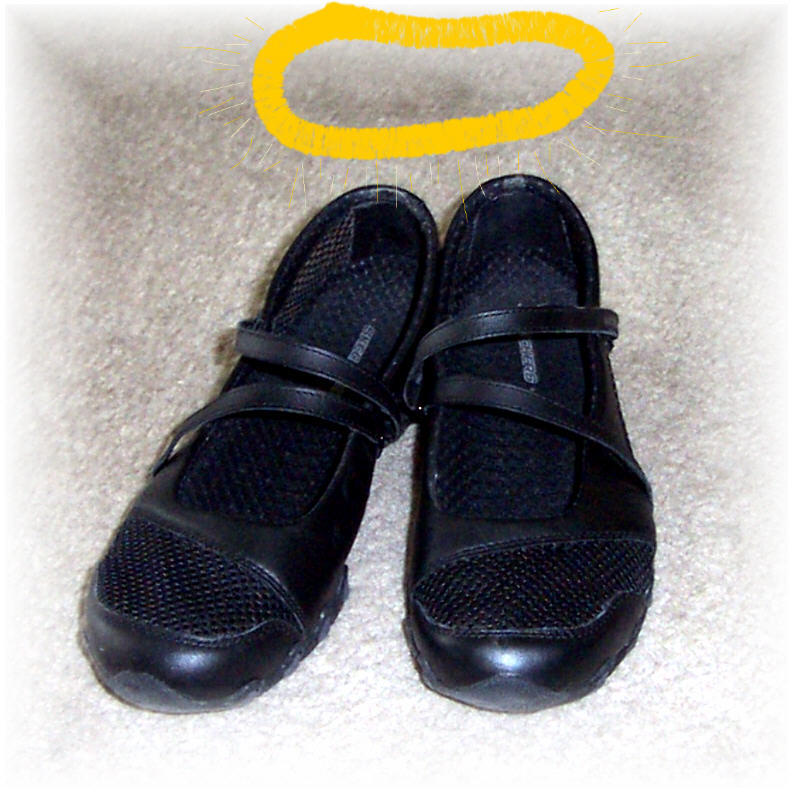
But it was while I was walking out of Mervyn's on the way to the parking lot that I found the cutest shoes! They're like Mary Jane dress shoes, tennis shoes, and they're SKECHERS! I never met a Skechers I didn't like, and I decided these were perfect!


That was before I wore them. By 7:00 a.m.on the first day of school--an hour before even school started--I was crippled. Some of my helpful friends said, "Put on some bandaids." I did. Shortly after 7:00 a.m. They rubbed off. Cheap-ass bandaids. Another one said, "Girl, you're shoes are too big, that's why you have blisters." No, I was walking with my toes shoved up front so IT WOULDN'T RUB ANYMORE. There were never any blisters. Just open wounds.

So, what's a girl to do besides suffer? Grin and bear it? All in the name of fashion, yesiree! Well, fashion for one day because for the rest of the week I had to find something professional to wear with my leather sandals. And I'm sure at some points I was neither both professional nor fashionable. Sigh. So much for trying.

The root of this shoe problem is that my feet are not used to being trapped. My heels are going to bleed no matter what shoes I put on--no matter how long I've had them or how painful it was to break my feet into them the first time. It's not just back-to-school time, it's TOUGHEN-UP-MY-FEET-FOR-REGULAR-SHOES time. So, wish me luck as I befriend the devil that lives in my shoes. Gotta dash now to Rite-Aid and stock up on band-aids.

My new favorite shoes. Aren't they cool? No, they're cruel.

Sigh.